Kitchen printing for restaurants: Every dish at its station.
OnaPOS prints from the cloud: no computer or software to install on site.
What it prints
What your kitchen needs to read.
Kitchen tickets
Each dish on its station’s printer, with as many copies as you need.
In the kitchen’s language
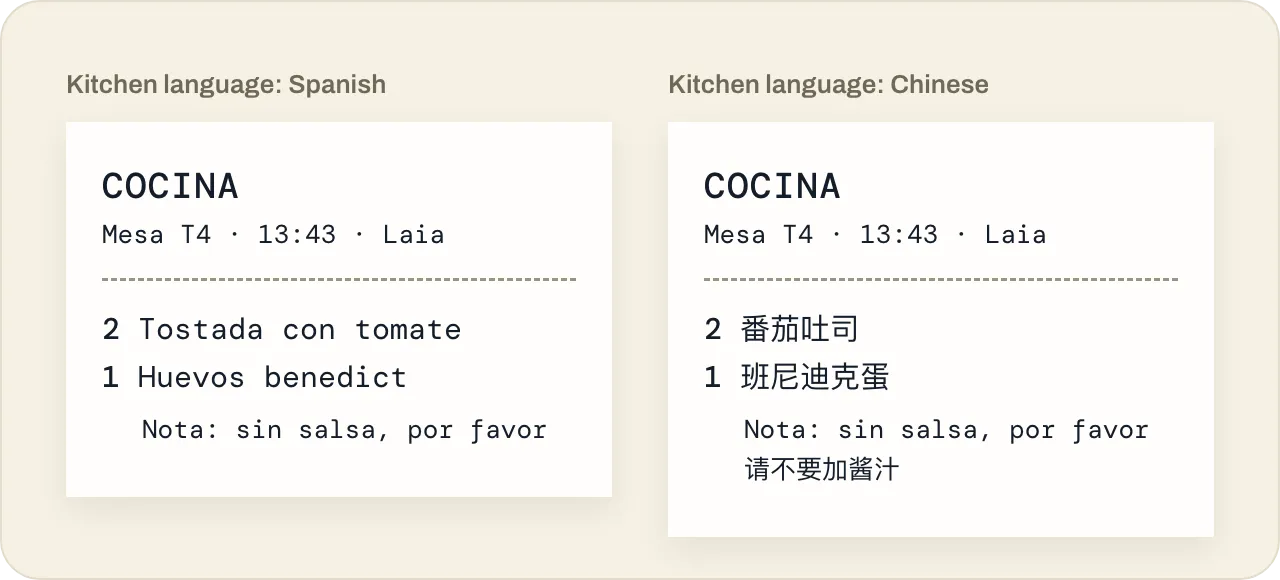
Dishes print in your kitchen’s language, Chinese characters included, and notes are translated: the kitchen reads the original and its own language.
And everything else
Void slips, guest receipts and Z reports. And the cash drawer connected to the printer.
Nothing to install
The printer connects to the internet and receives tickets from the cloud. No computer on site.
If something fails, you’ll know
If a printer stops responding, we alert you and retry.
Your card terminal, as usual
Keep your card terminal: OnaPOS records how each bill was paid.
Already have a printer? Tell us the model and we’ll check it works. No printer yet? We can sell you one.
Talk to usFAQ
About printing.
Do I need to install anything?
No. The printer connects to the internet and receives tickets from the cloud.
Which printers work?
Tell us which printer you have and we’ll check it works. No printer yet? We can sell you one that does.
What if a printer fails?
We alert you and retry.
What if the internet goes down?
OnaPOS runs in the cloud, so it needs a connection. Share a phone’s data or use a router with a 4G backup SIM: as soon as your devices and kitchen printer are online, everything carries on.
Ready to start?
Create your account and set it up at your own pace, or talk to us and we’ll set it up with you.
One price, every feature · No minimum term · AI assistant included