
Restaurant staff scheduling: Your team, scheduled and clocked in.
Everyone clocks in with their PIN on the restaurant’s device, gets their shifts on their phone, and you get the hours, with no extra app.
What’s included
From clock-in to hours.
A PIN for each person
On a shared device, everyone signs in with their PIN and every action is recorded under their name.
Clock-in, with a selfie if you want
Clock in and out on the restaurant’s device, with an optional selfie.
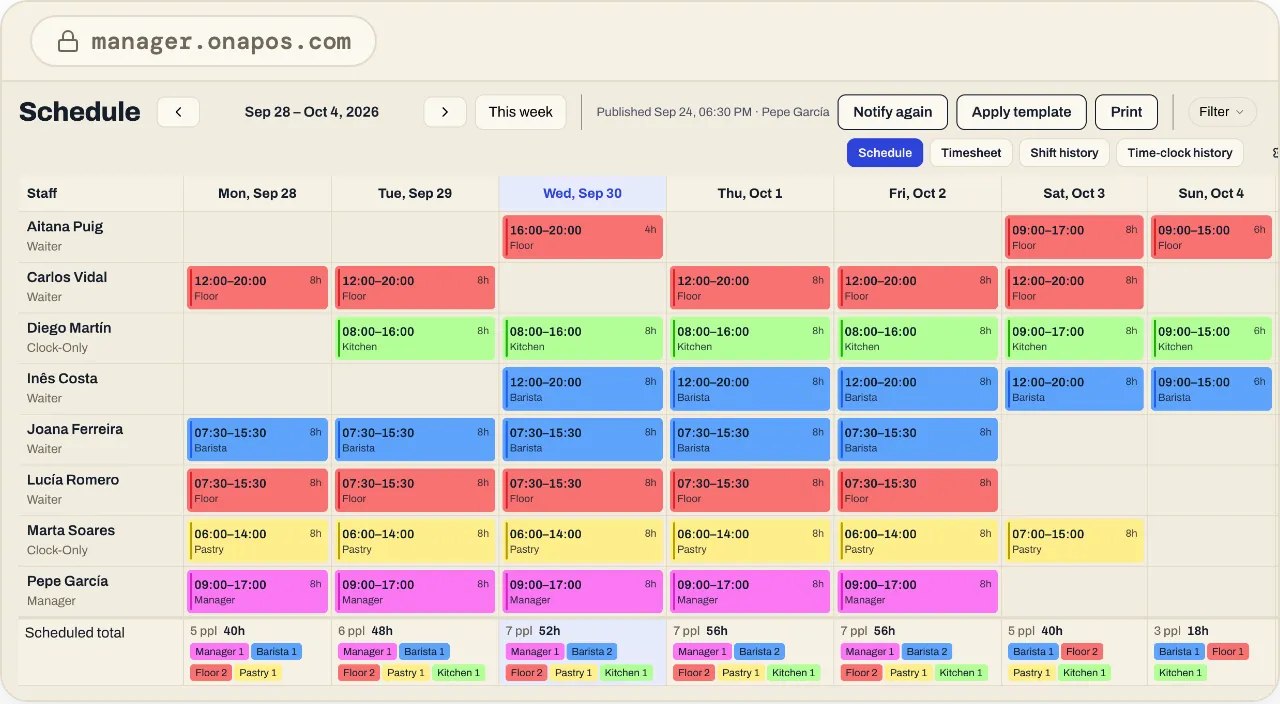
Weekly schedule
Plan the week and publish it: everyone gets a notification and sees their shifts in the OnaPOS app.
Timesheets
Clock-in and clock-out records and timesheets for each person, in Ona Manager.
AI assistant
Included in the priceA second manager for your team.
The AI assistant knows your team’s shifts and hours, and reports on them whenever you need, in Ona Manager.
See the AI assistant- Who’s working Saturday night?
- How many hours did the team work last week?
FAQ
About scheduling.
Do I need another app for clock-in?
No. People clock in on the restaurant’s device, in the OnaPOS app.
How does the team find out their shifts?
When you publish the schedule, everyone gets a notification and sees their shifts in the OnaPOS app.
Do you charge per person?
No. One fee per location, with no per-waiter charges.
Is the selfie required?
No. It’s optional: you decide whether to turn it on.
Ready to start?
Create your account and set it up at your own pace, or talk to us and we’ll set it up with you.
One price, every feature · No minimum term · AI assistant included